CollieAir: Frictionless Booking
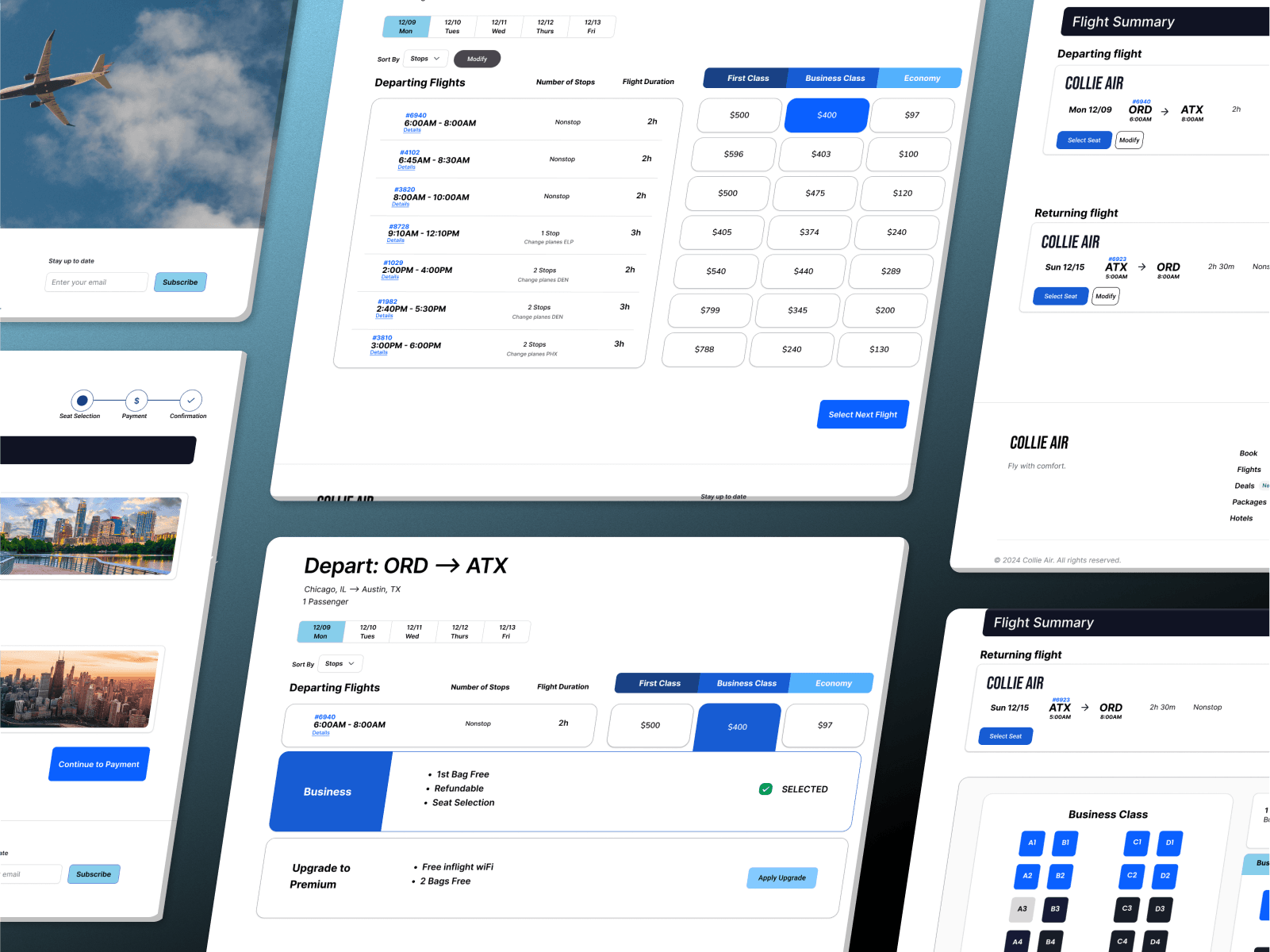
Designed an airline booking flow to reduce cognitive load, clarify pricing, and build trust resulting in 100% task completion, faster booking times, and a 4.5 user satisfaction rating in usability testing
100%
100%
Avg Task Success
Avg Task Success
12min
12min
Avg Task Time
Avg Task Time
4.5 / 5
4.5 / 5
User Satisfaction Rating
User Satisfaction Rating
User Research
User Research
User Research
Prototyping
Prototyping
Prototyping
Visual Design
Visual Design
Visual Design
E2E Design
E2E Design
E2E Design
Usability Testing
Usability Testing
Usability Testing

Duration:
3 months
Duration:
3 months
Role:
UX/UI Designer
Role:
UX/UI Designer
Industry
Airline
Industry
Airline
Summary:
I led the end-to-end redesign of an airline booking experience as part of a speculative case study project.
The goal was to design a flight booking experience that reduces cognitive load and helps travelers move from search to checkout with more clarity compared to benchmark.
I designed the search-to-checkout flight booking flow to reduce cognitive load, clarify pricing, and build trust at each step.
Results:
In usability testing, 100% of participants completed the task without assistance, average booking time dropped to 12 minutes (matching or beating a major airline benchmark), and satisfaction scored 4.5/5 for clarity and ease of use.
Limitations for this project included a low sample size in testing, no budget for recruitment, and testing a concept prototype.
I led the end-to-end redesign of an airline booking experience to tackle high cart abandonment caused by unclear flight selection, confusing fare tiers, and hidden costs.
I designed the search-to-checkout flight booking flow to reduce cognitive load, clarify pricing, and build trust at each step.
In usability testing, 100% of participants completed the task without assistance, average booking time dropped to 12 minutes (matching or beating a major airline benchmark), and satisfaction scored 4.6/5 for clarity and ease of use.
I led the end-to-end redesign of an airline booking experience to tackle high cart abandonment caused by unclear flight selection, confusing fare tiers, and hidden costs.
I designed the search-to-checkout flight booking flow to reduce cognitive load, clarify pricing, and build trust at each step.
In usability testing, 100% of participants completed the task without assistance, average booking time dropped to 12 minutes (matching or beating a major airline benchmark), and satisfaction scored 4.6/5 for clarity and ease of use.
BACKGROUND & CHALLENGE
A Booking Experience That Loses Travelers
Picture this: you're planning a trip, you've found your destination and dates and are ready to book. Yet instead of a smooth, reassuring checkout, you're hit with a dozen micro-decisions, and unclear pricing that quickly make you feel overwhelmed.
That’s the moment airlines lose customers.
What travelers need is a booking experience that doesn’t just function, but reduces friction, builds confidence, and encourages completion. Yet, it’s not just one airline that has overlooked their booking flow, it’s most. Their checkout processes are simply not designed around the expectations real users.
With customers across the board feeling overwhelmed, the challenge became clear: how might we design a flight booking experience that reduces cognitive load and helps travelers move from search to checkout with clarity?
BACKGROUND & CHALLENGE
A Booking Experience That Loses Travelers
Picture this: you're planning a trip, you've found your destination and dates and are ready to book. Yet instead of a smooth, reassuring checkout, you're hit with a dozen micro-decisions, and unclear pricing that quickly make you feel overwhelmed.
That’s the moment airlines lose customers.
What travelers need is a booking experience that doesn’t just function, but reduces friction, builds confidence, and encourages completion. Yet, it’s not just one airline that has overlooked their booking flow, it’s most. Their checkout processes are simply not designed around the expectations real users.
With customers across the board feeling overwhelmed, the challenge became clear: how might we design a flight booking experience that reduces cognitive load and helps travelers move from search to checkout with clarity?
BACKGROUND & CHALLENGE
A Booking Experience That Loses Travelers
Picture this: you're planning a trip, you've found your destination and dates and are ready to book. Yet instead of a smooth, reassuring checkout, you're hit with a dozen micro-decisions, and unclear pricing that quickly make you feel overwhelmed.
That’s the moment airlines lose customers.
What travelers need is a booking experience that doesn’t just function, but reduces friction, builds confidence, and encourages completion. Yet, it’s not just one airline that has overlooked their booking flow, it’s most. Their checkout processes are simply not designed around the expectations real users.
With customers across the board feeling overwhelmed, the challenge became clear: how might we design a flight booking experience that reduces cognitive load and helps travelers move from search to checkout with clarity?
Goal #1
Decrease Time on Task
Reduce average task completion rate compared to the industry average
Goal #2
Simplify Booking Flow
Achieve 100% task completion rate in usability testing
Goal #3
Increase User Satisfaction
Achieve average post-test user satisfaction rating of ≥4/5 for clarity and ease of use
MY APPROACH
Roadmap to a Winning Design
Booking abandonment in the airline industry is high because flows don’t match how travelers make decisions. To design an experience that would truly improve clarity and completion rates, I needed to ground every decision in real-world behavior and measurable benchmarks.
To achieve this I outlined the following approach:
1. Listening to Travelers First
Interviewed 5 recent flyers and reviewed competitor flows to uncover confusion points in flight selection, fare tiering, and pricing.
2. Designing for Clarity and Confidence
Created and iterated prototypes focused on reducing cognitive load, improving selection clarity, and making pricing transparent.
3. Validating Through Usability Testing
Ran usability tests comparing two iterations against a benchmark, measuring task completion time, success rate, and post-test usability ratings.
RESEARCH
Listening to Travelers First
Before sketching a single wireframe, I wanted to find the true moments of frustration that lead to an abandoned cart. I began with a two phase research approach that intended to understand the following:
Identify key friction points in current airline booking flows.
Benchmark performance against an industry example.
Understand traveler expectations for clarity and pricing transparency.
Phase 1
Survey
Hearing From Frequent Flyers
Hearing From Frequent Flyers
Surveyed 30 frequent flyers to identify common frustrations and quick wins for improvement.
Key Insight: 67% struggled to compare fare tiers, and 58% wanted baggage details shown upfront.
Surveyed 30 frequent flyers to identify common frustrations and quick wins for improvement.
Key Insight: 67% struggled to compare fare tiers, and 58% wanted baggage details shown upfront.
Phase 2
Usability Testing
Testing existing airline sites
Testing existing airline sites
Observed 5 travelers booking flights on United and American Airlines to benchmark task time and identify hesitation points.
Key Insight: Average booking time was 15 min, with frequent pauses during departure/return selection and seat choice.
Observed 5 travelers booking flights on United and American Airlines to benchmark task time and identify hesitation points.
Key Insight: Average booking time was 15 min, with frequent pauses during departure/return selection and seat choice.
ANALYSIS & INSIGHTS
Where Are Users Experiencing Frustration?
Through a combination of surveys, usability testing on existing airline booking flows, and journey mapping, I identified three recurring friction points that consistently disrupted the traveler experience:
ANALYSIS & INSIGHTS
Where Are Users Experiencing Frustration?
Through a combination of surveys, usability testing on existing airline booking flows, and journey mapping, I identified three recurring friction points that consistently disrupted the traveler experience:
ANALYSIS & INSIGHTS
Where Are Users Experiencing Frustration?
Through a combination of surveys, usability testing on existing airline booking flows, and journey mapping, I identified three recurring friction points that consistently disrupted the traveler experience:
Finding #1: Cluttered Navigation & Overloaded Homepages
Users encounter too many promotions and links before finding the main booking tool. This increases cognitive load and time to start booking. Usability reviews highlight that users prefer clean, “search-first” layouts and often get frustrated by cluttered pages.
Finding #1: Cluttered Navigation & Overloaded Homepages
Users encounter too many promotions and links before finding the main booking tool. This increases cognitive load and time to start booking. Usability reviews highlight that users prefer clean, “search-first” layouts and often get frustrated by cluttered pages.
Finding #2: Hidden or Confusing Add Ons (Bags, Seats, Fees)
Information about baggage allowances, seat fees, or add-on costs is not surfaced clearly during the booking flow. This leads to “sticker shock” at checkout and reduces trust in pricing. Users report having to search outside the site (e.g., Google) to find baggage policies
Finding #2: Hidden or Confusing Add Ons (Bags, Seats, Fees)
Information about baggage allowances, seat fees, or add-on costs is not surfaced clearly during the booking flow. This leads to “sticker shock” at checkout and reduces trust in pricing. Users report having to search outside the site (e.g., Google) to find baggage policies
Finding #3: Confusing Seat Selection Interfaces
Seat maps are bulky, unclear about perks (e.g., legroom, preferred zones), or use dark patterns to push premium seats. Frustrates users and creates distrust in upselling tactics. Usability tests report confusion due to poor labeling and overwhelming seat upgrade prompts.
Finding #3: Confusing Seat Selection Interfaces
Seat maps are bulky, unclear about perks (e.g., legroom, preferred zones), or use dark patterns to push premium seats. Frustrates users and creates distrust in upselling tactics. Usability tests report confusion due to poor labeling and overwhelming seat upgrade prompts.
SECONDARY RESEARCH
Validating Insights
To ensure our usability insights reflected broader traveler behavior, I used AI-assisted research to cross-reference industry reports, traveler surveys, and academic studies on airline booking. This analysis confirmed the same friction points, hidden pricing changes, unclear add-ons, and checkout hesitation, were widespread across the industry.
Beyond validation, secondary research revealed new considerations, such as the impact of price presentation order on trust and the role of inline guidance cues in reducing decision fatigue.
These findings allowed me to refine design priorities with confidence, ensuring solutions were both user-tested and aligned with broader market behaviors.
SECONDARY RESEARCH
Validating Insights
To ensure our usability insights reflected broader traveler behavior, I used AI-assisted research to cross-reference industry reports, traveler surveys, and academic studies on airline booking.
This analysis confirmed the same friction points, hidden pricing changes, unclear add-ons, and checkout hesitation, were widespread across the industry.
Beyond validation, secondary research revealed new considerations, such as the impact of price presentation order on trust and the role of inline guidance cues in reducing decision fatigue.
These findings allowed me to refine design priorities with confidence, ensuring solutions were both user-tested and aligned with broader market behaviors.
SECONDARY RESEARCH
Validating Insights
To ensure our usability insights reflected broader traveler behavior, I used AI-assisted research to cross-reference industry reports, traveler surveys, and academic studies on airline booking. This analysis confirmed the same friction points, hidden pricing changes, unclear add-ons, and checkout hesitation, were widespread across the industry.
Beyond validation, secondary research revealed new considerations, such as the impact of price presentation order on trust and the role of inline guidance cues in reducing decision fatigue.
These findings allowed me to refine design priorities with confidence, ensuring solutions were both user-tested and aligned with broader market behaviors.
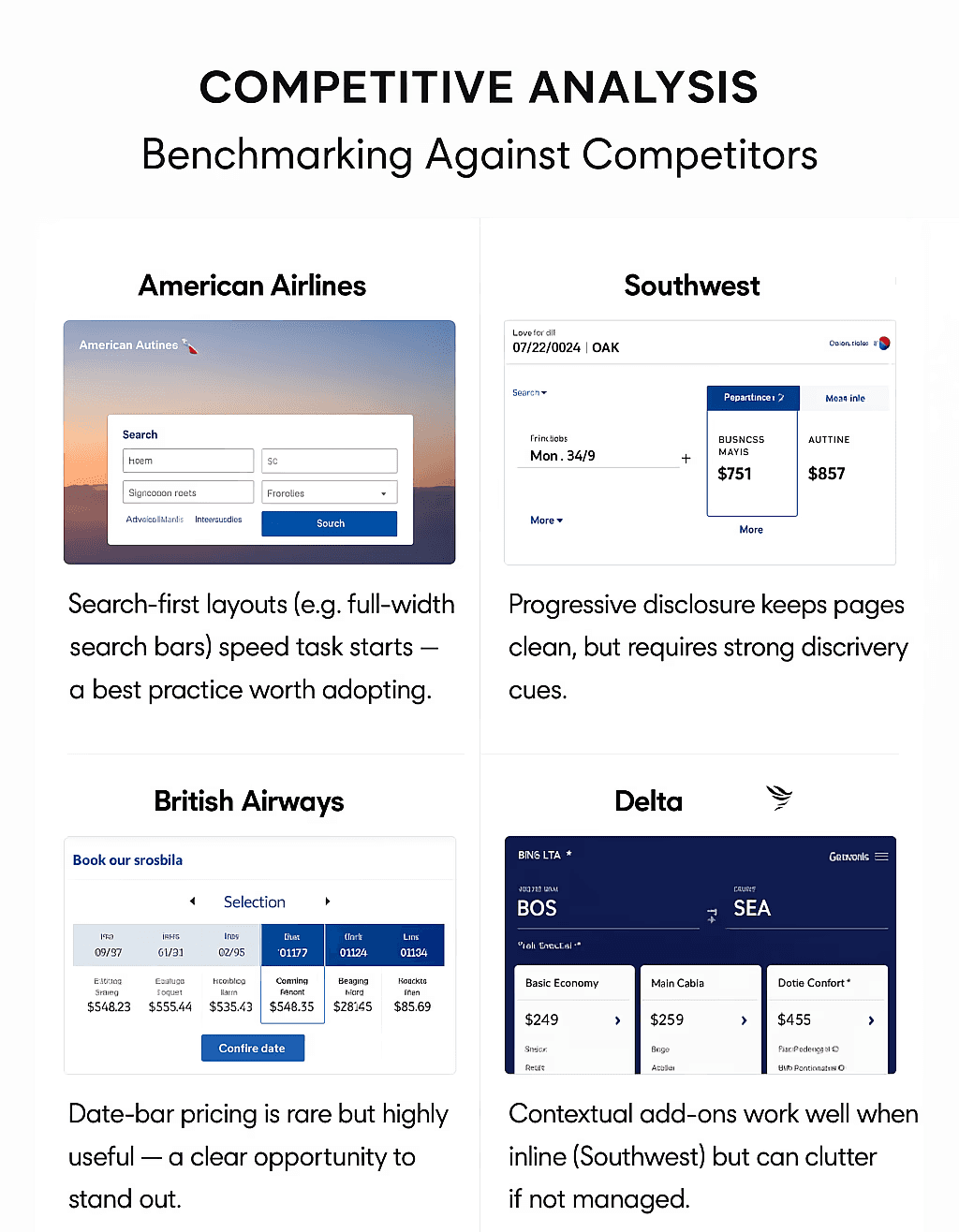
COMPETITIVE ANALYSIS
Benchmarking Against Competitors
I audited booking flows for American Airlines, Southwest, British Airways, and Delta to identify common patterns and opportunities for differentiation. These insights informed where to adopt proven patterns and where to innovate.
DESIGN PRIORITIES
Critical Aspects We Must Nail for a Winning Booking Flow
Priority 1: Streamline & Clarify the Core Search Experience (Highest Stakes)
If we get this wrong, users abandon the process before they’ve even started. Research showed that unclear search steps, hidden requirements, and lack of inline feedback were common pitfalls across competitor sites.
DESIGN PRIORITIES
Critical Aspects We Must Nail for a Winning Booking Flow
Priority 1: Streamline & Clarify the Core Search Experience (Highest Stakes)
If we get this wrong, users abandon the process before they’ve even started. Research showed that unclear search steps, hidden requirements, and lack of inline feedback were common pitfalls across competitor sites.
Design Commitments
Every required field visible and clearly labeled from the start no surprises.
Inline validation to catch errors or missed fields instantly.
Show both the pre-selected travel dates and an interactive calendar so users can adjust without confusion even if they’ve never booked online before.
Anticipate decision points and remove ambiguity, ensuring the search step feels effortless and guided..
Design Commitments
Every required field visible and clearly labeled from the start no surprises.
Inline validation to catch errors or missed fields instantly.
Show both the pre-selected travel dates and an interactive calendar so users can adjust without confusion even if they’ve never booked online before.
Anticipate decision points and remove ambiguity, ensuring the search step feels effortless and guided..
Why it Matters
This is the moment where user confidence is either built or broken. A flawless search experience not only reduces abandonment but sets the tone for the rest of the journey.
Why it Matters
This is the moment where user confidence is either built or broken. A flawless search experience not only reduces abandonment but sets the tone for the rest of the journey.
Priority 2: Make Add-Ons Transparent, Understandable & User-Led
Airline add-ons are notorious for causing mistrust, hesitation, and unnecessary complexity. Instead of using them as “gotcha” upsells, we’ll design them to empower the traveler.
Design Commitments
Immediate clarity on what’s included and what’s extra, no hunting for baggage allowances or seat upgrade details.
Progressive disclosure to reveal more info without overwhelming the user.
Use familiar, plain-language labels rather than industry jargon.
Display a real-time running cost tally so users see exactly how each choice affects the total price.
so users can adjust without confusion even if they’ve never booked online before.
Anticipate decision points and remove ambiguity, ensuring the search step feels effortless and guided..
Why it Matters
The big picture: An airline booking flow that anticipates your needs, keeps you in charge, and never tries to trick you into paying for things you don’t want or need.
Priority 2: Make Add-Ons Transparent, Understandable & User-Led
Airline add-ons are notorious for causing mistrust, hesitation, and unnecessary complexity. Instead of using them as “gotcha” upsells, we’ll design them to empower the traveler.
Design Commitments
Immediate clarity on what’s included and what’s extra, no hunting for baggage allowances or seat upgrade details.
Progressive disclosure to reveal more info without overwhelming the user.
Use familiar, plain-language labels rather than industry jargon.
Display a real-time running cost tally so users see exactly how each choice affects the total price.
Why it Matters
The big picture: An airline booking flow that anticipates your needs, keeps you in charge, and never tries to trick you into paying for things you don’t want or need.
DESIGN PRIORITIES
Critical Aspects We Must Nail for a Winning Booking Flow
Priority 1: Streamline & Clarify the Core Search Experience (Highest Stakes)
If we get this wrong, users abandon the process before they’ve even started. Research showed that unclear search steps, hidden requirements, and lack of inline feedback were common pitfalls across competitor sites.
Design Commitments
Every required field visible and clearly labeled from the start no surprises.
Inline validation to catch errors or missed fields instantly.
Show both the pre-selected travel dates and an interactive calendar so users can adjust without confusion even if they’ve never booked online before.
Anticipate decision points and remove ambiguity, ensuring the search step feels effortless and guided..
Why it Matters
This is the moment where user confidence is either built or broken. A flawless search experience not only reduces abandonment but sets the tone for the rest of the journey.
Priority 2: Make Add-Ons Transparent, Understandable & User-Led
Airline add-ons are notorious for causing mistrust, hesitation, and unnecessary complexity. Instead of using them as “gotcha” upsells, we’ll design them to empower the traveler.
Design Commitments
Immediate clarity on what’s included and what’s extra, no hunting for baggage allowances or seat upgrade details.
Progressive disclosure to reveal more info without overwhelming the user.
Use familiar, plain-language labels rather than industry jargon.
Display a real-time running cost tally so users see exactly how each choice affects the total price
Why it Matters
The big picture: An airline booking flow that anticipates your needs, keeps you in charge, and never tries to trick you into paying for things you don’t want or need.
PROCESS
Design & Iteration Roadmap
How do I bring these design priorities to life so I can start building a flow that fixes user frustration? Designing!
It was finally time to start the most exciting part of the project, where I started with sketching quick concepts and ended with validating high-fidelity prototypes.
PROCESS
Design & Iteration Roadmap
How do I bring these design priorities to life so I can start building a flow that fixes user frustration? Designing!
It was finally time to start the most exciting part of the project, where I started with sketching quick concepts and ended with validating high-fidelity prototypes.
INITIAL DESIGNS
Design Phase Outcomes & Rationale
Following the Crazy 8’s workshop, I explored eight rapid variations of the booking flow, focusing on making the core search step effortless and transparent in line with my design priorities.
Through evaluation and review I chose to further develop the following designs because they were the most streamlined, included all essential CTA's with few clicks, and had the most potential to reduced cognitive load.
INITIAL DESIGNS
Design Phase Outcomes & Rationale
Following the Crazy 8’s workshop, I explored eight rapid variations of the booking flow, focusing on making the core search step effortless and transparent in line with my design priorities.
Through evaluation and review I chose to further develop the following designs because they were the most streamlined, included all essential CTA's with few clicks, and had the most potential to reduced cognitive load.
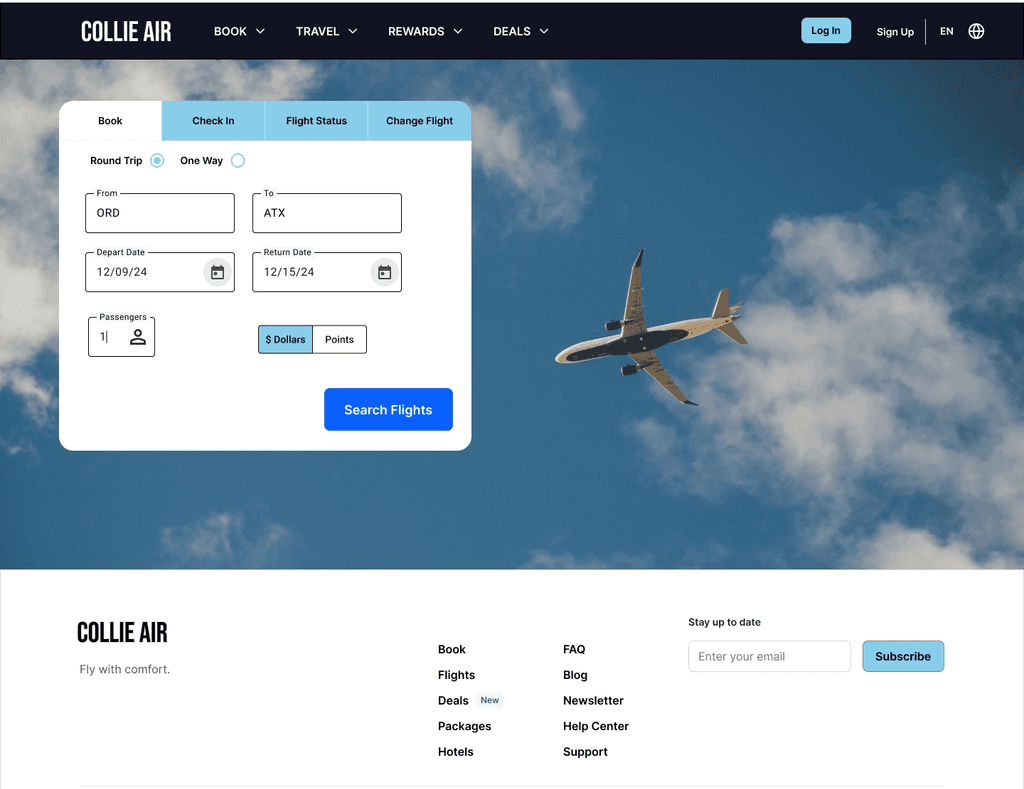
Design Rationale: Landing Page
Designed a minimalist, clutter-free, "search first" layout to match user preferences discovered in research (see finding #1)
Included search box on landing page rather than making users click a "book" tab.
Made all required fields visible on search box with clear labels, and an embedded calendar that allows manual date selection.
Left space for promotions to live in background (where plane image is) to meet business needs while reducing cognitive load for users .
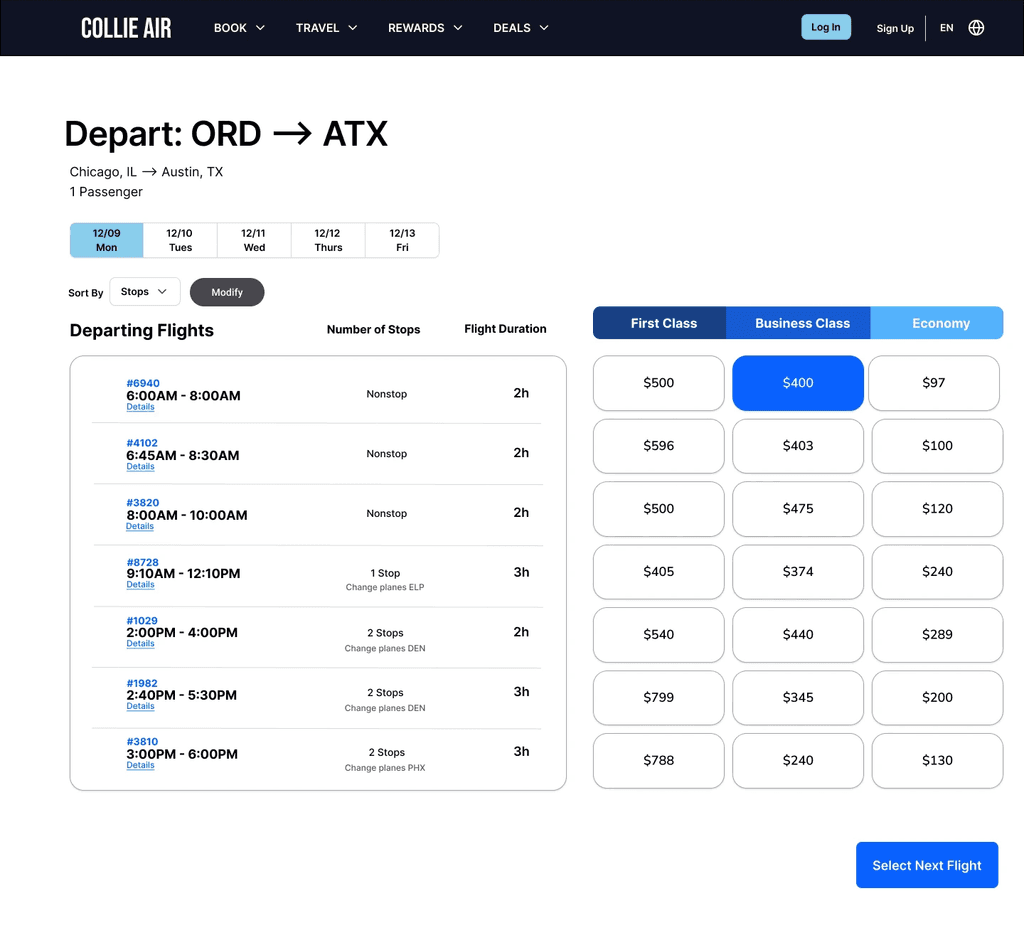
Design Rationale: Flight Selection
Intentionally showed pricing across all three tiers for easy comparison (prevent sticker shock - see finding #2)
Designed clean, consistent card layout with times, duration, stops, and prices clearly visible, to reduce clicks and cognitive load.
Incorporated inline filters and instant highlighting to ensure quick, confident choices.
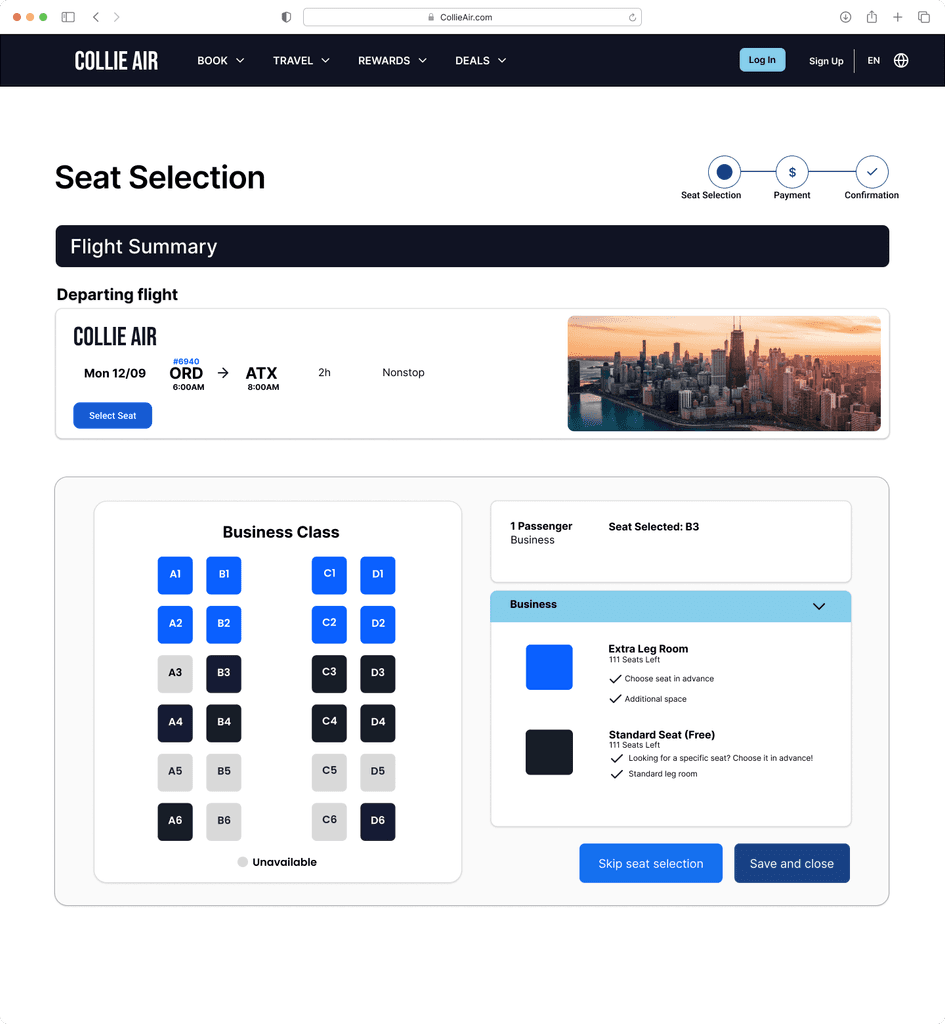
Seat Selection
I prioritized making the seat map intuitive so that users can easily understand which seats are available vs unavailable.
I added a section that clearly indicates what the different seats offer so users highlights can make confident choices without guesswork.
Offered the option to skip seat selection to ensure users aren't forced to select empowering them with full control of the experience.
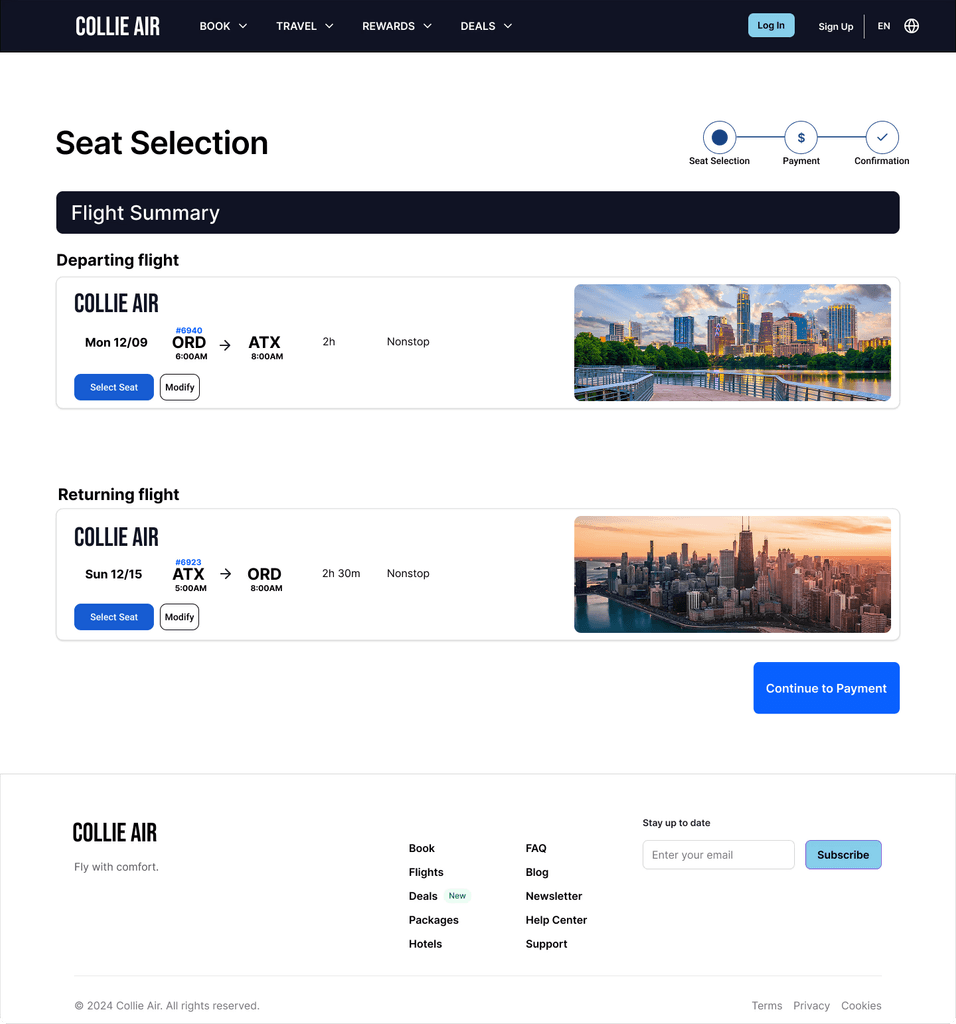
Flight Confirmation
Designed a clear final review of trip details in one glance to provide an opportunity for users to make changes
Goal is to reinforce trust before purchase.
USABILITY TESTING
Testing For Effectiveness
To evaluate the effectiveness of the booking experience, I moderated usability tests with 5 participants who had booked a flight online within the past 6 months. I chose this approach because it would reveal painpoints and would uncover areas of improvement.
Each participant was asked to complete a realistic task:
Book a one round trip flight from Boise to Denver for March 15-19th.
Dates: March 15-19th
2 Passengers
Paying in dollars (not points)
Go through the process and stop before checkout page
Participants were encouraged to think aloud while completing the task, allowing me to capture their reactions, confusion points, and decision-making moments in real time. I did not provide help to users, instead allowing them to go through the flow organically.
USABILITY TESTING
Testing For Effectiveness
To evaluate the effectiveness of the booking experience, I moderated usability tests with 5 participants who had booked a flight online within the past 6 months. I chose this approach because it would reveal painpoints and would uncover areas of improvement.
Each participant was asked to complete a realistic task:
Book a one round trip flight from Boise to Denver for March 15-19th.
Dates: March 15-19th
2 Passengers
Paying in dollars (not points)
Go through the process and stop before checkout page
Participants were encouraged to think aloud while completing the task, allowing me to capture their reactions, confusion points, and decision-making moments in real time. I did not provide help to users, instead allowing them to go through the flow organically.
Testing Parameters
Device: Laptop or desktop browser
Prototype: High-fidelity clickable prototype built in Figma
Scenario: Book a round trip domestic flight using the new booking flow
Time limit: None
Device: Laptop or desktop browser
Prototype: High-fidelity clickable prototype built in Figma
Scenario: Book a round trip domestic flight using the new booking flow
Time limit: None
Success Metrics
Time on Task: How long it took users to complete the full booking flow
Task Completion Rate: How many users completed the task
User Satisfaction: Post-task survey using a 1–5 rating scale on ease of use and visual clarity
Qualitative Feedback: Observations, quotes, and emotional reactions captured during the session
Time on Task: How long it took users to complete the full booking flow
Task Completion Rate: How many users completed the task
User Satisfaction: Post-task survey using a 1–5 rating scale on ease of use and visual clarity
Qualitative Feedback: Observations, quotes, and emotional reactions captured during the session
USABILITY TESTING RESULTS
Key Learnings
The usability testing confirmed that the redesigned Collie Air booking flow delivered on its core goals: reducing friction, boosting clarity, and creating a booking experience that felt markedly easier than typical airline sites. Users completed their tasks quickly and confidently, validating the direction of the design while also revealing a few areas for refinement.
What Worked
Users found the flow “clean,” “intuitive,” and “easy to follow” fostering confidence and efficiency.
100% task completion (5/5 participants) achieved.
Average task time: 12 minutes (vs. 15 min industry benchmark).
Satisfaction: 4.5/5 for ease and clarity.
Challenges & Insights
Seat icons caused friction: users hovered to understand meaning—indicating unclear visual cues.
Testing scope limited: only one round with a small sample, raising questions about broader usability.
Next Steps
Refine seat icon design (add legends/tooltips).
Conduct a second usability round with more participants and varied user types..
USABILITY TESTING RESULTS
Key Learnings
The usability testing confirmed that the redesigned Collie Air booking flow delivered on its core goals: reducing friction, boosting clarity, and creating a booking experience that felt markedly easier than typical airline sites. Users completed their tasks quickly and confidently, validating the direction of the design while also revealing a few areas for refinement.
What Worked
Users found the flow “clean,” “intuitive,” and “easy to follow,” fostering confidence and efficiency.
100% task completion (5/5 participants) achieved.
Average task time: 12 minutes (vs. 15 min industry benchmark).
Satisfaction: 4.6/5 for ease and clarity.
Challenges & Insights
Seat icons caused friction: users hovered to understand meaning—indicating unclear visual cues.
Testing scope limited: only one round with a small sample, raising questions about broader usability.
Next Steps
Refine seat icon design (add legends/tooltips).
Conduct a second usability round with more participants and varied user types..
PROCESS
Design & Iteration Roadmap
How do I bring these design priorities to life so I can start building a flow that fixes user frustration? Designing!
It was finally time to start the most exciting part of the project, where I started with sketching quick concepts and ended with validating high-fidelity prototypes.
INITIAL DESIGNS
Design Phase Outcomes
Following the Crazy 8’s workshop, I explored eight rapid variations of the booking flow, focusing on making the core search step effortless and transparent in line with Priority 1.
Through quick evaluation and review, I converged on a streamlined layout that brought all essential inputs into immediate view and reduced cognitive load.
This concept was then translated into low-fidelity wireframes, where interactions and decision points were mapped in detail. Iterative feedback from a senior designer on these wireframes led to the finalized end-to-end flow, from flight search to confirmation, that was ready for usability testing.
Landing Page
All required fields are present from the start, with clear labels, and an embedded calendar that allows manual date selection.
Flight Selection
Presents flights in a clean, consistent card layout with times, duration, stops, and prices clearly visible, supported by inline filters and instant highlighting to ensure quick, confident choices.
Seat Selection
Highlights available, premium, and unavailable seats with intuitive color coding and hover tooltips, ensuring travelers can make confident choices without guesswork.
Flight Confirmation
Clear, final review of trip details, pricing breakdown, and passenger info in one glance, reinforcing trust before purchase.
USABILITY TESTING
Testing For Effectiveness
To evaluate the effectiveness of the booking experience, I moderated usability tests with 5 participants who had booked a flight online within the past 6 months. I chose this approach because it would reveal painpoints and would uncover areas of improvement.
Each participant was asked to complete a realistic task:
Book a one round trip flight from Boise to Denver for March 15-19th.
Dates: March 15-19th
2 Passengers
Paying in dollars (not points)
Go through the process and stop before checkout page
Participants were encouraged to think aloud while completing the task, allowing me to capture their reactions, confusion points, and decision-making moments in real time. I did not provide help to users, instead allowing them to go through the flow organically.
Testing Parameters
Device: Laptop or desktop browser
Prototype: High-fidelity clickable prototype built in Figma
Scenario: Book a round trip domestic flight using the new booking flow
Time limit: None
Success Metrics
Time on Task: How long it took users to complete the full booking flow
Task Completion Rate: How many users completed the task
User Satisfaction: Post-task survey using a 1–5 rating scale on ease of use and visual clarity
Qualitative Feedback: Observations, quotes, and emotional reactions captured during the session
USABILITY TESTING RESULTS
Key Learnings
The usability testing confirmed that the redesigned Collie Air booking flow delivered on its core goals: reducing friction, boosting clarity, and creating a booking experience that felt markedly easier than typical airline sites. Users completed their tasks quickly and confidently, validating the direction of the design while also revealing a few areas for refinement.
What Worked
Users found the flow “clean,” “intuitive,” and “easy to follow,” fostering confidence and efficiency.
100% task completion (5/5 participants) achieved.
Average task time: 12 minutes (vs. 15 min industry benchmark).
Satisfaction: 4.6/5 for ease and clarity.
Challenges & Insights
Seat icons caused friction: users hovered to understand meaning—indicating unclear visual cues.
Testing scope limited: only one round with a small sample, raising questions about broader usability.
Next Steps
Refine seat icon design (add legends/tooltips).
Conduct a second usability round with more participants and varied user types..