Noto Banking:Mobile App Design

Noto Banking:
Mobile App Design

I led a 3-month UX case study for a challenger bank MVP, conducting research and usability testing that raised task success from 68% to 84%, cut transfer time by 40%, and was preferred by 60% of users over their current app.

100%

Avg Task Success

5 sec

Avg Task Time

4.6 / 5

User Satisfaction Rating

100%

Avg Task Success

5 sec

Avg Task Time

4.6 / 5

User Satisfaction Rating

UX Research

UX Research

Prototyping

Usability Testing

Branding

Visual Design
Duration:

3 months

Duration:

3 months

Role:

UX UI Designer

Role:

UX UI Designer

Industry

FinTech/ Mobile Banking

Industry

FinTech/ Mobile Banking

Duration:

3 months

Duration:

3 months

Role:

UX UI Designer

Role:

UX UI Designer

Industry

FintTech/ Mobile Banking

Industry

FintTech/ Mobile Banking

Summary:

I independently led end-to-end UX for a 3-month MVP mobile banking concept.

Over three months, I conducted user research (surveys, interviews, competitive analysis), defined streamlined user flows, and iterated on high-fidelity prototypes through multiple rounds of usability testing.


Results:

Task completion rates improved from 68% to 84%, average time on task dropped by 12% overall (with a 40% reduction for money transfers), and ease-of-use ratings rose from 3.8 to 4.6/5.

Importantly, 60% of participants preferred this prototype to their existing app demonstrating how clarity and intentional design can directly improve trust and retention for challenger banks.

Summary:

I independently led end-to-end UX for a 3-month MVP mobile banking concept.

Over three months, I conducted user research (surveys, interviews, competitive analysis), defined streamlined user flows, and iterated on high-fidelity prototypes through multiple rounds of usability testing.


Results:

Task completion rates improved from 68% to 84%, average time on task dropped by 12% overall (with a 40% reduction for money transfers), and ease-of-use ratings rose from 3.8 to 4.6/5.

Importantly, 60% of participants preferred this prototype to their existing app demonstrating how clarity and intentional design can directly improve trust and retention for challenger banks.

THE CHALLENGE

The Challenge: Designing a Challenger Bank MVP to Build Trust and Retention

I was tasked with developing an MVP for a challenger banking app concept. The goal was to redesign the mobile banking experience back to what it should be: simple, fast, and trustworthy.

The premise was straightforward: check your balance, move your money, get on with your day.

I approached this challenge under conditions that mirror early-stage product work: no research budget, no design system, and no brand identity. I led the full UX process from the ground up, conducting research, synthesizing insights, prototyping, testing, and refining every step along the way.

High-level goals were to:

  • Make core tasks feel effortless and immediate

  • Reduce friction by eliminating visual and cognitive noise

  • Build trust through clarity, personalization, and intentional design

SNEAK PEEK AT RESULTS

Impact at a Glance

Key results from usability testing and iterations:

  • Task completion improved: 68% to 84%

  • Avg. time on task reduced: ↓12% overall | ↓40% transfers

  • Ease-of-use rating: 3.8 to 4.6 / 5

  • User preference: 60% preferred prototype over their current app

RESEARCH

Understanding Mobile Banking Users

Before designing anything, I needed to know what users were actually experiencing. I created a multi-phase research study to uncover user priorities and pain points. Each research phase built on the last, ensuring that design decisions were both informed and user-centered, even without access to a live product or research budget.

The study focused on three simple questions:

  1. What do users actually use their banking apps for?

  2. Where do they struggle most?

  3. What do they wish was better?

Phase 1

Desk Research

Using Gemini’s AI search and manual review, I analyzed:

  • 150+ App Store reviews (SoFi, Chase, Citi)

  • Reddit threads and fintech articles

  • Independent studies on digital banking usability

Phase 2

User Survey

Surveyed 30 active mobile banking users to:


  • Spot patterns and prioritize features for the prototype.

  • Evaluate user satisfaction with: checking balance, sending money, transferring funds.

  • Uncover missing capabilities users expect.

Phase 3

User Interviews

Conducted 5 remote interviews to:

  • Dive deeper into user habits and expectations.

  • Understand mental model.

  • Validate insights from previous research phases.

USER INSIGHTS

Where Are Users Getting Stuck?

Research uncovered a clear gap between what users want to do and how banking apps are designed to work. Instead of helping users accomplish quick, everyday tasks, many interfaces create friction and confusion.

These issues significantly impacted user satisfaction and potentially, user retention. For branchless banks like SoFi, this is especially concerning, as the app serves as the sole touchpoint between the customer and the brand.

Three recurring pain points stood out:

Finding #1: Core tasks should be quick and easy ⏱️

Users primarily use mobile banking apps for straightforward, transactional purposes, like checking balances or sending money. 

They don’t expect (or want) to spend much time in the app. Efficiency and ease of access are top priorities.

Finding #1: Core tasks should be quick and easy ⏱️

Users primarily use mobile banking apps for straightforward, transactional purposes, like checking balances or sending money. 

They don’t expect (or want) to spend much time in the app. Efficiency and ease of access are top priorities.

Finding #2: Promotional content gets in the way 🔎

Many apps blend promotional messages with account information, making it harder for users to focus on what they came to do. This mix creates frustration and distracts from core tasks.

Finding #2: Promotional content gets in the way 🔎

Many apps blend promotional messages with account information, making it harder for users to focus on what they came to do. This mix creates frustration and distracts from core tasks.

Finding #3: Less is more ✅

Users often feel overwhelmed by the sheer number of features in popular banking apps. Many described the interfaces as “cluttered”, “too time consuming,” and generally “overwhelming.” These added features frequently overshadow the essential functions users rely on most.

Finding #3: Less is more ✅

Users often feel overwhelmed by the sheer number of features in popular banking apps. Many described the interfaces as “cluttered”, “too time consuming,” and generally “overwhelming.” These added features frequently overshadow the essential functions users rely on most.

COMPETITIVE ANALYSIS

What Are Existing Solutions Doing Well?

Before I could jump into designing, it was important to define success and understand what mobile banking apps were getting right.

My goal was to pinpoint specific usability problems with popular banking. I conducted a heuristic evaluation to systematically identify design weaknesses and uncover targeted opportunities for improvement.

I focused on SoFi, Chase, and Citi for this evaluation.

SoFi

Strengths 💪: Personalized insights, modern branding.

Weaknesses ❎: Visual clutter, overwhelming home screen.

Chase

Strengths 💪: Robust features

Weaknesses ❎: Complex navigation, too many deep links

Citi

Strengths 💪: Consistent branding, clean UI

Weaknesses ❎: Key actions hidden, limited shortcuts.
While the visual design and interactions across these apps were generally consistent, the homepages often felt overwhelming.

A wide range of content, from promotional banners to educational resources and account details, was presented without clear prioritization.

This lack of structure made it harder for users to quickly find what they needed, especially given that each user arrives with a different task in mind. Reorganizing this content with a clearer hierarchy could ease cognitive load and allow the most relevant information to stand out based on user intent.

INFORMATION ARCHITECTURE

Designing the Flow

I developed a user flow that simplified the banking experience to make key tasks fast, intuitive, and free of clutter.

The mobile banking experience was organized across three core screens:

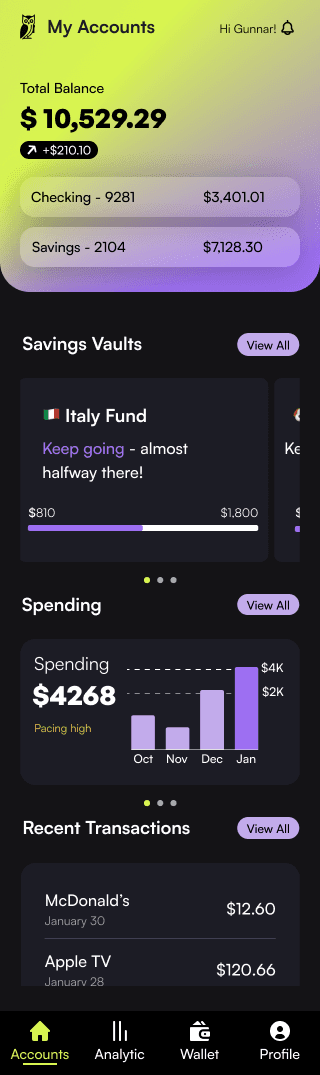
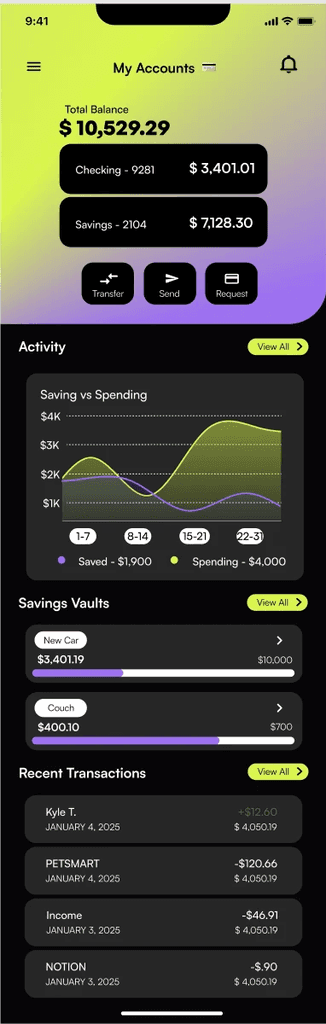
  1. My Accounts – The default home screen that serves as a one-stop shop for priority actions with minimal scrolling and tapping. Users can check balances, send money, view an overview of spending activity, and review recent transactions.

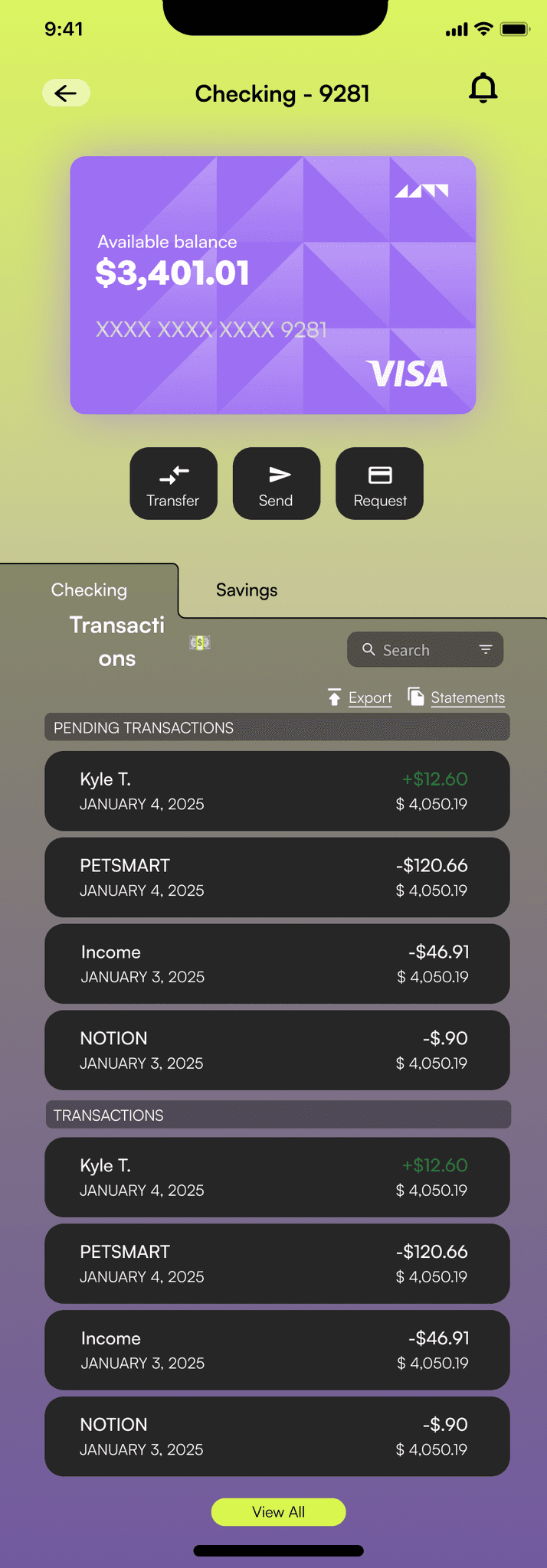
  2. Transactions – A detailed list of all transactions showing the amount, date, and the option to move money between accounts. Checking and savings each have their own dedicated transactions page.

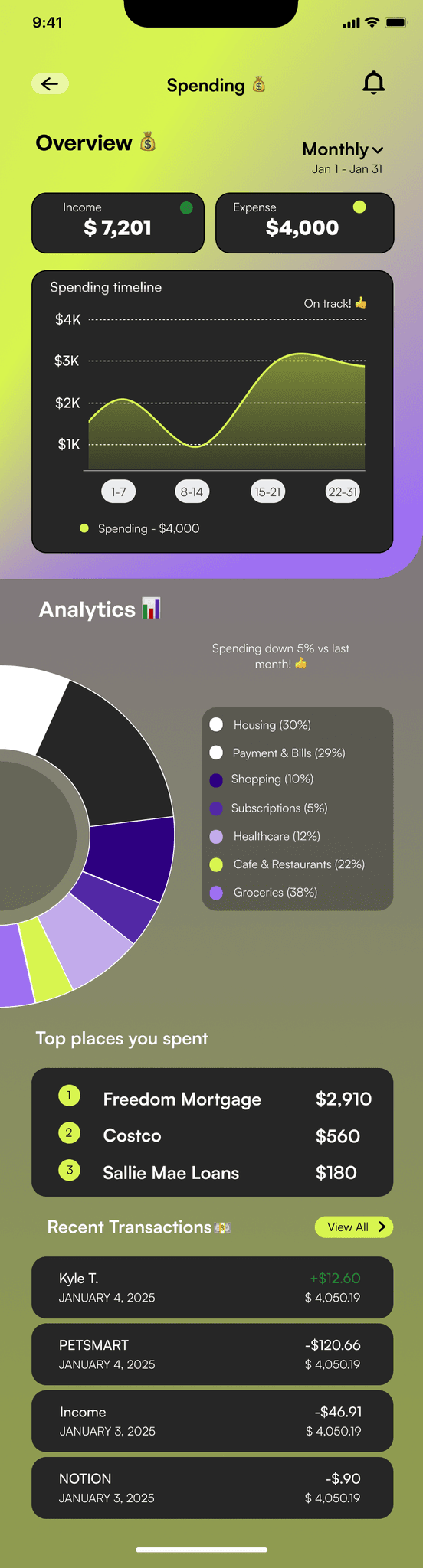
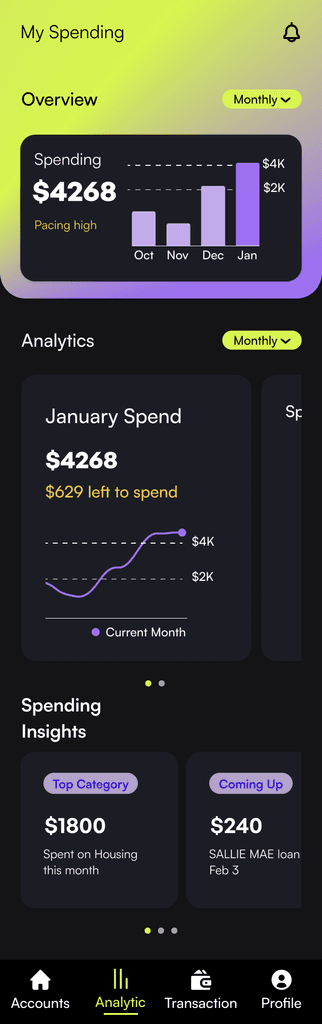
  3. Spending – A dedicated tab displaying money coming in and going out, along with spending categories. This gives users a clear understanding of where their money is going.

I created multiple iterations and ultimately chose the flows that required the fewest taps. The goal was to make the app so intuitive that even a first-time mobile banking user could easily find what they need.

While the visual design and interactions across these apps were generally consistent, the homepages often felt overwhelming.

A wide range of content, from promotional banners to educational resources and account details, was presented without clear prioritization.

This lack of structure made it harder for users to quickly find what they needed, especially given that each user arrives with a different task in mind. Reorganizing this content with a clearer hierarchy could ease cognitive load and allow the most relevant information to stand out based on user intent.

INFORMATION ARCHITECTURE

Designing the Flow

I developed a user flow that simplified the banking experience to make key tasks fast, intuitive, and free of clutter.

The mobile banking experience was organized across three core screens:

  1. My Accounts – The default home screen that serves as a one-stop shop for priority actions with minimal scrolling and tapping. Users can check balances, send money, view an overview of spending activity, and review recent transactions.

  2. Transactions – A detailed list of all transactions showing the amount, date, and the option to move money between accounts. Checking and savings each have their own dedicated transactions page.

  3. Spending – A dedicated tab displaying money coming in and going out, along with spending categories. This gives users a clear understanding of where their money is going.

I created multiple iterations and ultimately chose the flows that required the fewest taps. The goal was to make the app so intuitive that even a first-time mobile banking user could easily find what they need.

While the visual design and interactions across these apps were generally consistent, the homepages often felt overwhelming.

A wide range of content, from promotional banners to educational resources and account details, was presented without clear prioritization.

This lack of structure made it harder for users to quickly find what they needed, especially given that each user arrives with a different task in mind. Reorganizing this content with a clearer hierarchy could ease cognitive load and allow the most relevant information to stand out based on user intent.

INFORMATION ARCHITECTURE

Designing the Flow

I developed a user flow that simplified the banking experience to make key tasks fast, intuitive, and free of clutter.

The mobile banking experience was organized across three core screens:

  1. My Accounts – The default home screen that serves as a one-stop shop for priority actions with minimal scrolling and tapping. Users can check balances, send money, view an overview of spending activity, and review recent transactions.

  2. Transactions – A detailed list of all transactions showing the amount, date, and the option to move money between accounts. Checking and savings each have their own dedicated transactions page.

  3. Spending – A dedicated tab displaying money coming in and going out, along with spending categories. This gives users a clear understanding of where their money is going.

I created multiple iterations and ultimately chose the flows that required the fewest taps. The goal was to make the app so intuitive that even a first-time mobile banking user could easily find what they need.

Initial Designs

My Accounts

Transactions

Spending

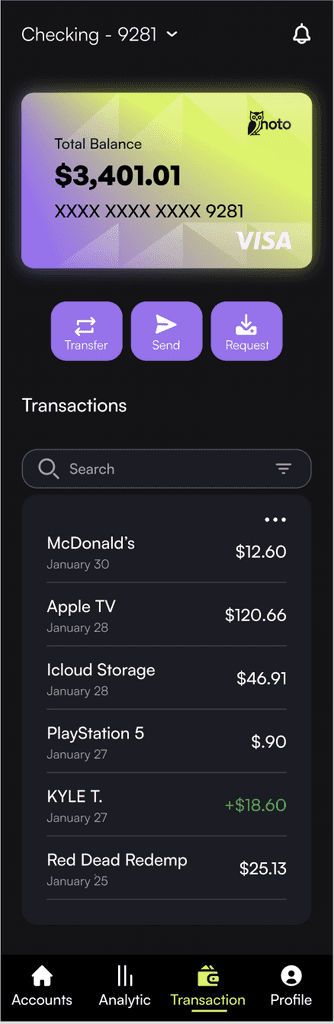
"My Accounts" Screen Design Decisions

Home Screen Layout: Centralized all balances and core “moving money” actions in the hero section to reduce taps, added Recent Transactions for quick access, and tucked secondary features into the navigation drawer to minimize cognitive load.


Visual Design Choices: Broke from dark mode in the hero section to highlight essential tasks, using complementary accent colors (yellow and purple) to draw attention and create visual interest.


Initial Designs

My Accounts

Transactions

Spending

"My Accounts" Screen Design Decisions

Layout:


  • Included all balances in hero section of home screen for easy access (research finding #1).

  • Included core "moving money" tasks to hero section to reduce taps.

  • Tucked away extras in navigation drawer to reduce cognitive load.

  • Added "Recent Transactions" to home screen for easy access.


UI Decisions:


  • Deviated from "dark mode" color scheme on hero section to draw attention to core tasks.

  • Selected complementary colors (yellow & purple) as accent colors to create visual interest.


ITERATIONS

UI Decisions & Iterations

I aimed to create a modern, sleek interface that reflects the app’s intuitive and seamless user experience.

To achieve a playful yet sophisticated style, I explored both light and dark mode designs paired with bright accent colors.

Initially, I tested a predominantly blue palette a color often associated with trust. However, it felt too similar to other banking apps like Chase and SoFi, which rely heavily on blue as a primary accent.

To differentiate the brand, I shifted to a dark mode foundation accented with yellow and purple, a complementary pairing that adds vibrancy while evoking a sense of exclusivity.

I experimented with multiple gradient treatments, adjusting color intensities and pairings across several iterations of each screen. This process helped refine the balance between aesthetic appeal and usability.
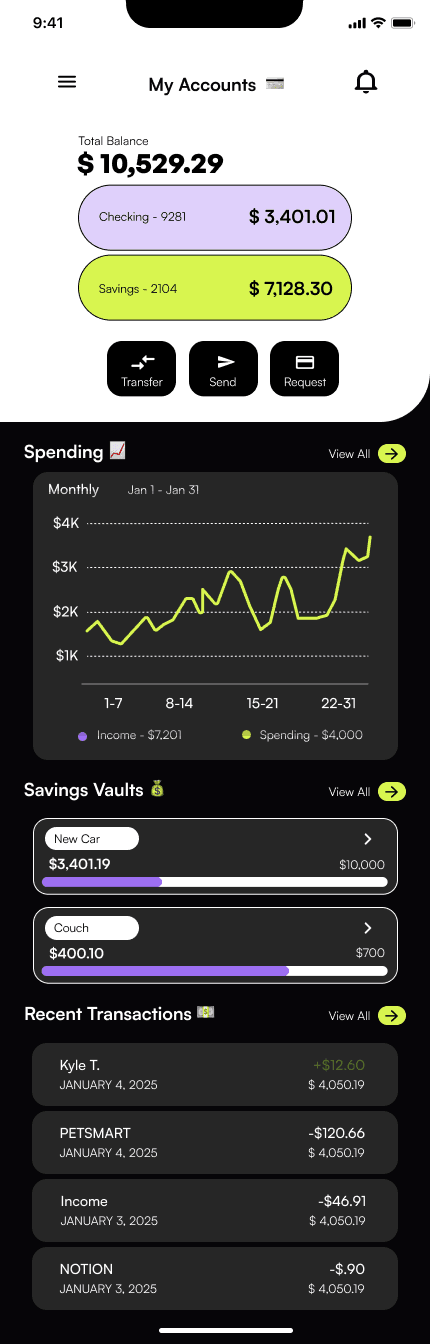
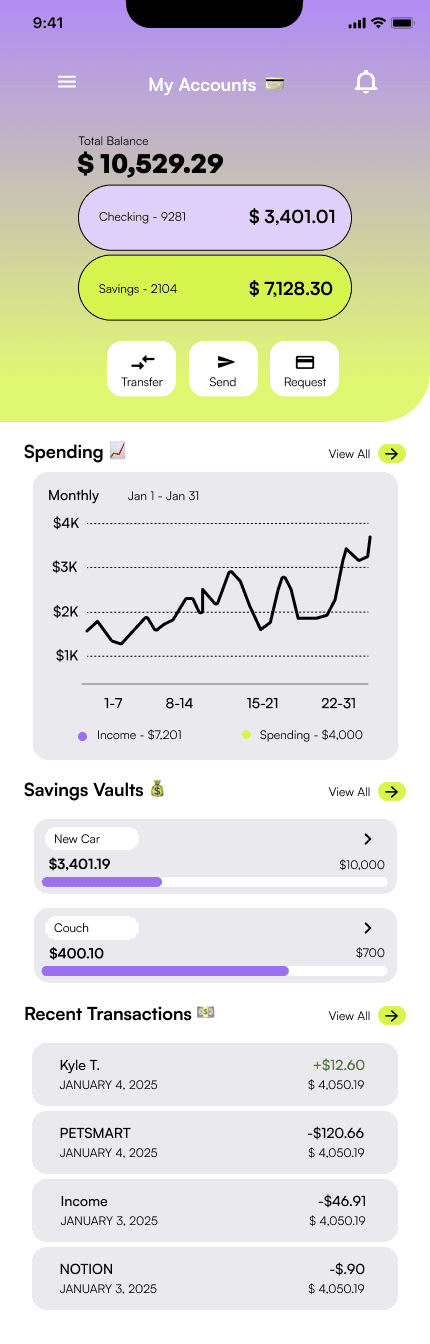
Initial Design Iterations "My Accounts"

Initial Design Iterations "My Accounts"

Initial Design Iterations "My Accounts"

FEEDBACK & ITERATIONS

Design Critique

To validate my approach, I sought a design critique from a mentor who is a senior design manager. Their main observation was:

“There are too many competing elements, I don’t know what I’m supposed to focus on.”

Despite my intention to create a dynamic interface, the design felt noisy and visually overwhelming. To reduce cognitive load, I prioritized the following changes in the next iteration:

  1. Declutter the Hero Section
    The original layout displayed multiple balances, action buttons, and dense content, which created cognitive overload instead of convenience.
    Key change: Simplified the view to show only balances in this section.

  2. Reduce Competing Colors
    The harsh black text against a gradient background made it difficult to establish a visual hierarchy.
    Key change: Updated balances to a light, transparent white and adjusted sub-element colors to a softer, complementary gray.

  3. Improve Navigation
    The hamburger menu required extra taps and hid essential features.
    Key change: Replaced it with a bottom navigation bar to keep critical actions visible and streamline navigation.

FEEDBACK & ITERATIONS

Design Critique

To validate my approach, I sought a design critique from a mentor who is a senior design manager. Their main observation was:

“There are too many competing elements, I don’t know what I’m supposed to focus on.”

Despite my intention to create a dynamic interface, the design felt noisy and visually overwhelming. To reduce cognitive load, I prioritized the following changes in the next iteration:

  1. Declutter the Hero Section
    The original layout displayed multiple balances, action buttons, and dense content, which created cognitive overload instead of convenience.
    Key change: Simplified the view to show only balances in this section.

  2. Reduce Competing Colors
    The harsh black text against a gradient background made it difficult to establish a visual hierarchy.
    Key change: Updated balances to a light, transparent white and adjusted sub-element colors to a softer, complementary gray.

  3. Improve Navigation
    The hamburger menu required extra taps and hid essential features.
    Key change: Replaced it with a bottom navigation bar to keep critical actions visible and streamline navigation.

FEEDBACK & ITERATIONS

Design Critique

To validate my approach, I sought a design critique from a mentor who is a senior design manager. Their main observation was:

“There are too many competing elements, I don’t know what I’m supposed to focus on.”

Despite my intention to create a dynamic interface, the design felt noisy and visually overwhelming. To reduce cognitive load, I prioritized the following changes in the next iteration:

  1. Declutter the Hero Section
    The original layout displayed multiple balances, action buttons, and dense content, which created cognitive overload instead of convenience.
    Key change: Simplified the view to show only balances in this section.

  2. Reduce Competing Colors
    The harsh black text against a gradient background made it difficult to establish a visual hierarchy.
    Key change: Updated balances to a light, transparent white and adjusted sub-element colors to a softer, complementary gray.

  3. Improve Navigation
    The hamburger menu required extra taps and hid essential features.
    Key change: Replaced it with a bottom navigation bar to keep critical actions visible and streamline navigation.

Implementing Feedback "My Accounts" Screen

Implementing Feedback "My Accounts" Screen

USABILITY TESTING

Validating Design Choices

I then created a high-fidelity prototype with changes from my design critique to test and validate this close-to-final design with users. I conducted two rounds of usability testing with five active mobile banking users (Chase, SoFi, Citi). Users were asked to complete core tasks to assess clarity, ease of navigation, and visual comprehension.

Tasks Assessed:

  • Checking Account Balance

  • Sending Money

  • Transferring Money

  • Identifying monthly spending

  • Finding transactions for checking accounts

USABILITY TESTING ROUND 1

Testing showed an average 68% task completion rate across all three tasks, with some tasks rated as noticeably easier than others.

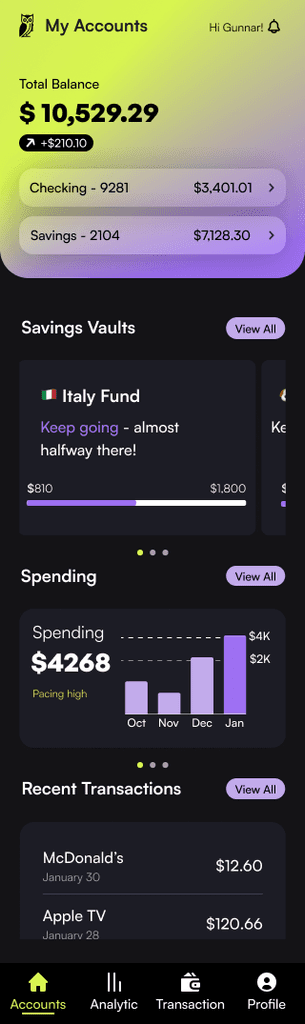
Key insights revealed areas of user frustration that needed to be addressed before the second testing round. Half of the participants struggled to locate where to complete the “move money” task, largely because the term Wallet was unclear.

Additionally, several users did not realize that the “Checking” and “Savings” cards were clickable. This caused unnecessary delays when they tried to view account-specific information.

Changes made to the "My Accounts" screen:

  1. Added chevrons to the Checking and Savings cards to signal interactivity.

  2. Renamed “Wallet” to “Transactions” for greater clarity.

Implementing Feedback "My Accounts" Screen

USABILITY TESTING ROUND 2

Measuring the Impact of Design Refinements

Next, I translated the updated design to evaluate how well the refinements addressed previous usability issues. This second round of testing showed a clear improvement with a decrease in average time spent on task of 12%.

The “transaction” tasks showed the sharpest decrease in time on task with a net change of 1 minute 15 seconds to 45 seconds. This indicated that the terminology, rather than the flow, was a usability issue.

Designs Tested Round 2

Time on Task: Round 1 vs Round 20s17s34s51s68s85s35s25sChecking Account Balance75s66sSending Money80s70.4sTransferring Money60s40sIdentifying Monthly Spending55s35sFinding Transactions (Checking)Round 1Round 2Avg. Time on Task (seconds)
USABILITY TESTING

Validating Design Choices

I then created a high-fidelity prototype with changes from my design critique to test and validate this close-to-final design with users. I conducted two rounds of usability testing with five active mobile banking users (Chase, SoFi, Citi). Users were asked to complete core tasks to assess clarity, ease of navigation, and visual comprehension.

Tasks Assessed:

  • Checking Account Balance

  • Sending Money

  • Transferring Money

  • Identifying monthly spending

  • Finding transactions for checking accounts

USABILITY TESTING ROUND 1

Testing showed an average 68% task completion rate across all three tasks, with some tasks rated as noticeably easier than others.

Key insights revealed areas of user frustration that needed to be addressed before the second testing round. Half of the participants struggled to locate where to complete the “move money” task, largely because the term Wallet was unclear.

Additionally, several users did not realize that the “Checking” and “Savings” cards were clickable. This caused unnecessary delays when they tried to view account-specific information.

Changes made to the "My Accounts" screen:

  1. Added chevrons to the Checking and Savings cards to signal interactivity.

  2. Renamed “Wallet” to “Transactions” for greater clarity.

Implementing Feedback "My Accounts" Screen

USABILITY TESTING ROUND 2

Measuring the Impact of Design Refinements

Next, I translated the updated design to evaluate how well the refinements addressed previous usability issues. This second round of testing showed a clear improvement with a decrease in average time spent on task of 12%.

The “transaction” tasks showed the sharpest decrease in time on task with a net change of 1 minute 15 seconds to 45 seconds. This indicated that the terminology, rather than the flow, was a usability issue.

Designs Tested Round 2

Time on Task: Round 1 vs Round 20s17s34s51s68s85s35s25sChecking Account Balance75s66sSending Money80s70.4sTransferring Money60s40sIdentifying Monthly Spending55s35sFinding Transactions (Checking)Round 1Round 2Avg. Time on Task (seconds)

Usability Testing Metrics

MetricRound 1Round 2Insight
Task Completion Rate68%
84%
Users completed more tasks successfully after refinements.
Average Time on TaskBaseline
↓ 12% overall
↓ 40% on “Move Money” task
Streamlining terminology and layout significantly reduced friction.
Ease of Use Rating (1–5)Avg. 3.8
Avg. 4.6
Users found the interface more intuitive post-iteration.
Compared to Existing App
60% said it was easier to use
Over half preferred this design to their current bank’s app.
Open-Ended FeedbackMixed clarity, confusion over terms like "Wallet", tappable elements unclear
“Feels much cleaner and more modern.”
“Everything I need is where I expect it.”
Design changes addressed key blockers and improved confidence.
USER FEEDBACK

Overall feedback indicated a smoother, more intuitive experience compared to the initial round of testing, Users quickly adapted to the interface with no prompting needed. After testing users were asked to rate the experience on ease of use. The average score came in at a 4.6/5.

"It was pretty straight forward, I thought it was really easy to use"

SUMMARY OF RESULTS

In summary, 60% of users ranked this prototype as being “easier to use” than their existing mobile banking app.

Testing showed a clear improvement with a decrease in average time spent on task of 12%. Users overall rated the experience as positive and intuitive, a key measure of success which would save users time and reduce friction.
Usability Testing Metrics

MetricRound 1Round 2Insight
Task Completion Rate68%
84%
Users completed more tasks successfully after refinements.
Average Time on TaskBaseline
↓ 12% overall
↓ 40% on “Move Money” task
Streamlining terminology and layout significantly reduced friction.
Ease of Use Rating (1–5)Avg. 3.8
Avg. 4.6
Users found the interface more intuitive post-iteration.
Compared to Existing App
60% said it was easier to use
Over half preferred this design to their current bank’s app.
Open-Ended FeedbackMixed clarity, confusion over terms like "Wallet", tappable elements unclear
“Feels much cleaner and more modern.”
“Everything I need is where I expect it.”
Design changes addressed key blockers and improved confidence.
WHY IT MATTERS

For digital-first challenger banks, the app is the primary touchpoint with customers. By reducing friction and making core tasks effortless, this redesign directly impacts retention (fewer users dropping off mid-task), trust (clear, transparent flows), and engagement (users check balances and transact more often when it’s easy). In competitive fintech markets, these improvements translate to stronger loyalty and long-term customer value.

WHY IT MATTERS

For digital-first challenger banks, the app is the primary touchpoint with customers.

By reducing friction and making core tasks effortless, this redesign directly impacts retention (fewer users dropping off mid-task), trust (clear, transparent flows), and engagement (users check balances and transact more often when it’s easy).

In competitive fintech markets, these improvements translate to stronger loyalty and long-term customer value.

© 2025, Nicky Eggert

Back to Top

Create a free website with Framer, the website builder loved by startups, designers and agencies.